
PGP encryption has landed in Alias Email. You can now attach a recipient’s PGP public key to any of your forwarding addresses, and we automatically encrypt every message forwarded to it — so only that recipient can read it, not their mailbox provider and not us. It’s available on Premium. Here’s what that means, why it matters, and how to switch it on.
Almost all email today is encrypted in transit — the connection between mail servers is protected by TLS. But that protection ends the moment the message lands. According to Google’s email encryption transparency report, encryption in transit only guards the hop between servers; once an email is delivered, it sits in your mailbox as plain text that your provider can read, that gets indexed and scanned, and that is exposed in full if that mailbox is ever breached. In-transit encryption is the envelope on a letter — it stops nothing once the letter is opened and filed away.
Email aliases and forwarding solve one half of the privacy problem: they hide your real address so services never learn who you are. But the content of every forwarded message still travels through servers and comes to rest in your inbox unencrypted. PGP encryption closes that second gap. This guide explains what PGP email encryption is, why it matters specifically for forwarded mail, exactly what it does and doesn’t protect, and how to turn it on for the emails your aliases forward to you.
Table of Contents
- What Is PGP Email Encryption?
- Why Standard Email Isn’t Private
- Where Email Forwarding Adds Risk
- How PGP Closes the Gap
- What PGP Does and Doesn’t Protect
- How to Encrypt Forwarded Email in Alias Email
- How to Get a PGP Key Pair
- Key Takeaways
- FAQs
What Is PGP Email Encryption?
PGP — short for “Pretty Good Privacy” — is a standard for encrypting messages so that only the intended recipient can read them. The open version that powers most modern tools is called OpenPGP, defined in the IETF’s RFC 4880. It has been the backbone of serious email privacy for over 30 years, and it is what journalists, security researchers, and privacy-focused mail providers rely on for end-to-end protection.
PGP works with a pair of mathematically linked keys:
- A public key, which you can share freely. Anyone can use it to encrypt a message addressed to you, but it cannot decrypt anything.
- A private key, which never leaves your device. It is the only thing that can decrypt messages that were encrypted with your public key.
The magic of this design is that encryption and decryption use different keys. To send you a private message, someone only needs your public key — and even if they, or an eavesdropper, or the server passing the message along has that public key, none of them can read the result. Only your private key, held on your device, can unlock it. This is what “end-to-end encryption” means: the message is sealed at one end and can only be opened at the other, with nothing in between able to look inside.
Why Standard Email Isn’t Private
Email was designed in the 1970s and 1980s with no privacy built in. Every improvement since — including the TLS encryption that protects messages between servers today — has been bolted on around a system that, at its core, moves plain text. That leaves several points where your mail is fully readable:
- At rest in your mailbox. Once delivered, your email is stored unencrypted on your provider’s servers. The provider can scan it for advertising signals, feature training, or spam filtering, and staff or automated systems can access it.
- In a breach. If your mailbox provider is compromised — or if you reuse a password that leaks — an attacker who gets in can read years of correspondence. As we cover in what happens when your email is leaked in a data breach, exposed inboxes are a goldmine for identity theft and targeted phishing.
- Through intermediaries. Mail often passes through relays, forwarders, and filtering services. Each one handles the message in the clear.
TLS is genuinely important — it stops passive interception on the wire — but it is transit-only. The instant a message reaches a mailbox, it becomes a plaintext document sitting on someone else’s computer. If you want content that stays private even from the servers that store it, you need encryption that only you can undo. That is exactly what PGP provides.
Where Email Forwarding Adds Risk
Email aliases are one of the best privacy tools available: instead of handing your real address to every store, app, and newsletter, you give out a unique alias that quietly forwards to your real inbox. If an alias starts getting spam or shows up in a breach, you disable it and your real address is never exposed. (If you’re new to the concept, our guide on email aliases vs. forwarding breaks down how the two relate.)
But forwarding introduces an extra leg to the journey. A message now travels from the sender, to the alias/forwarding service, and then on to your real mailbox — and every one of those hops handles the message content. The forwarding service is, by definition, a middleman that receives your mail before passing it along. That is a reasonable thing to trust for routing, but it is one more place where plaintext exists, and one more mailbox (your real one) where the forwarded copy comes to rest unencrypted.
A privacy-respecting forwarder should minimize this. At Alias Email we don’t read your mail, we store messages for a maximum of three days, and everything runs over TLS with SPF and DKIM. But “we don’t read it” is a policy. PGP turns it into math: when the forwarded message is encrypted to your key, we can’t read the content even if we wanted to, and neither can your mailbox provider once it arrives.

How PGP Closes the Gap
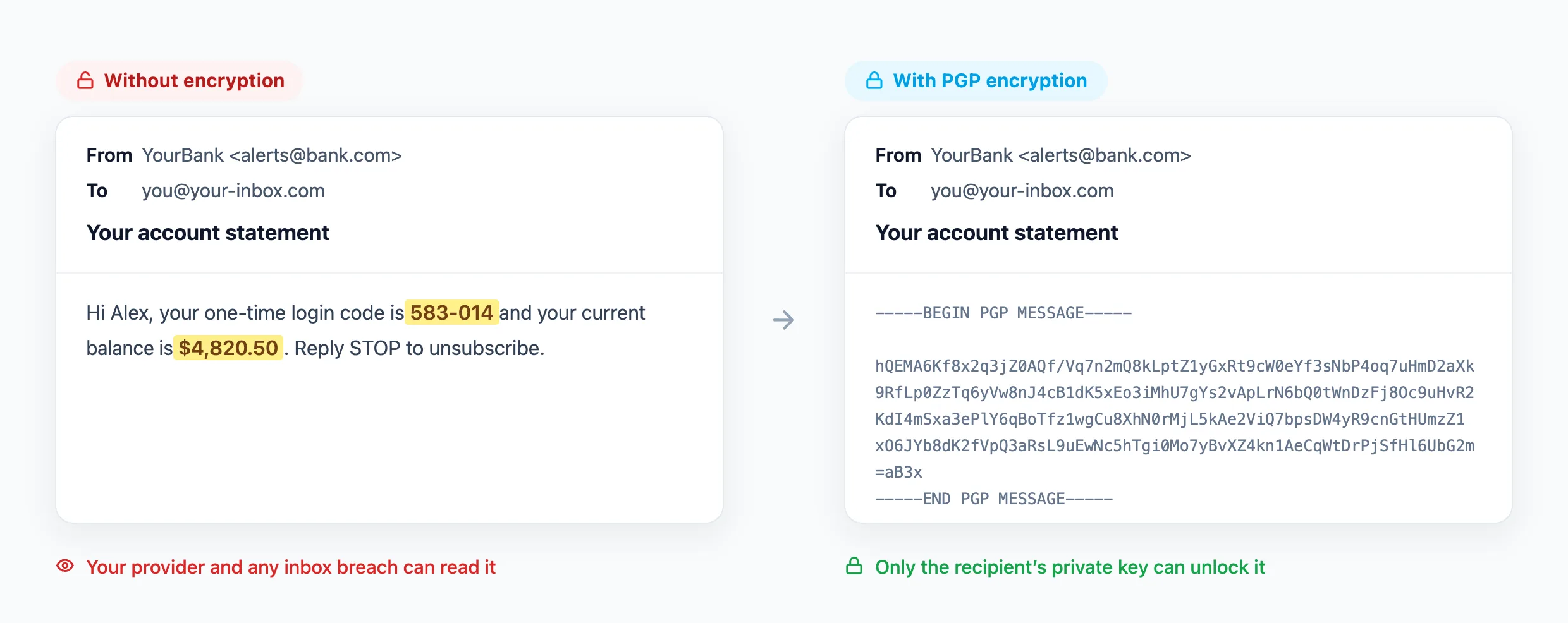
When you attach a recipient’s PGP public key to a forwarding address, the forwarding step changes. Instead of relaying the message as-is, Alias Email encrypts the forwarded copy with that public key before it leaves our servers. From that point on:
- Only the private key holder can read it. The message that lands in your mailbox is ciphertext. Your email provider stores an unreadable blob; you decrypt it locally with your private key when you open it.
- A mailbox breach exposes nothing useful. If your real inbox is ever compromised, the forwarded messages are encrypted at rest — an attacker sees scrambled data, not your correspondence.
- The forwarder is removed from the trust equation. Because encryption happens on the way out and only your device holds the private key, the content’s privacy no longer depends on trusting the service to behave.
In short, PGP takes the one remaining plaintext copy — the forwarded message sitting in your inbox — and seals it so that you, and only you, can open it. Combined with aliases hiding your address, you get privacy on both fronts: who you are and what was said.
What PGP Does and Doesn’t Protect
PGP is powerful, but it is not magic, and understanding its limits is part of using it well.
What it protects
- The message body and attachments of the forwarded email, encrypted so only your private key can decrypt them.
- Content at rest in your real mailbox, so your provider and any future breach see only ciphertext.
What it doesn’t protect
- Metadata. The routing information — who sent the message, the delivery path, timestamps, and typically the subject line — is not encrypted by PGP. If a subject line is sensitive, treat it as public.
- The first hop. The original sender still emails your alias over ordinary email. That leg is protected by TLS in transit but is not end-to-end encrypted, because the sender doesn’t hold your PGP key. PGP protects everything from the forwarding step onward — the copy that reaches and rests in your inbox.
- A lost private key. If you lose your private key, no one — including you — can decrypt those messages. There is no password-reset backdoor. That is the point, and it’s why key backups matter.
Think of PGP as sealing the forwarded copy the moment it’s in our hands and keeping it sealed through storage in your inbox. It closes the biggest and most persistent exposure — plaintext at rest — even though it can’t rewrite how email routing fundamentally works.
How to Encrypt Forwarded Email in Alias Email
Alias Email supports per-recipient PGP encryption on Premium. “Per-recipient” means encryption is tied to the address that receives the forwarded mail, so each of your forwarding destinations can have its own key. Here’s how to set it up:
- Get the recipient’s PGP public key. If you’re forwarding to your own inbox, that’s your public key (your private key stays with you). If you don’t have one yet, see the next section.
- Open your account settings. Sign in to the Alias Email dashboard and go to Settings, where your recipient (forwarding) email addresses are listed.
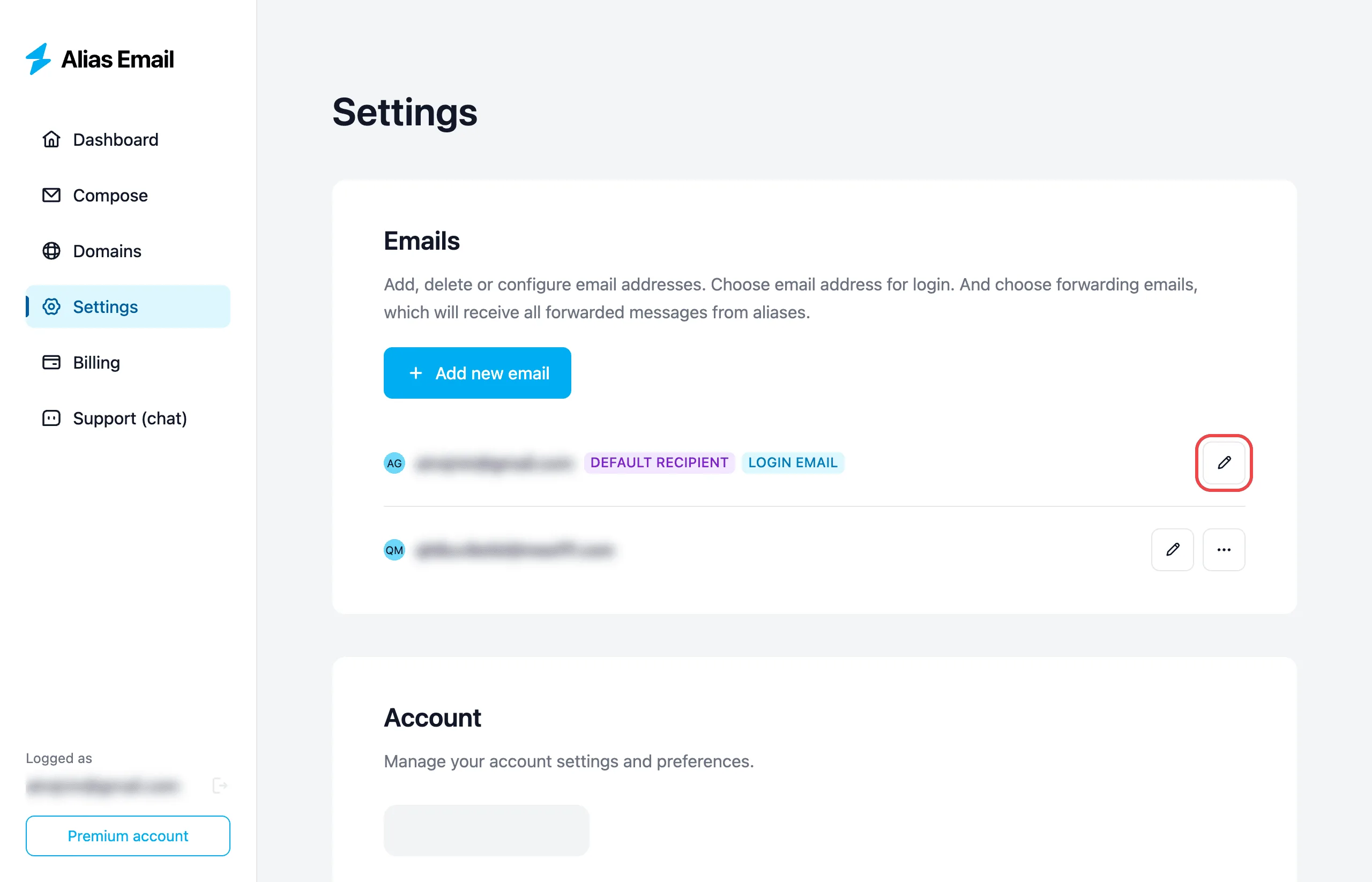
- Edit the recipient address. Open the address you want to secure and choose to configure its PGP key.
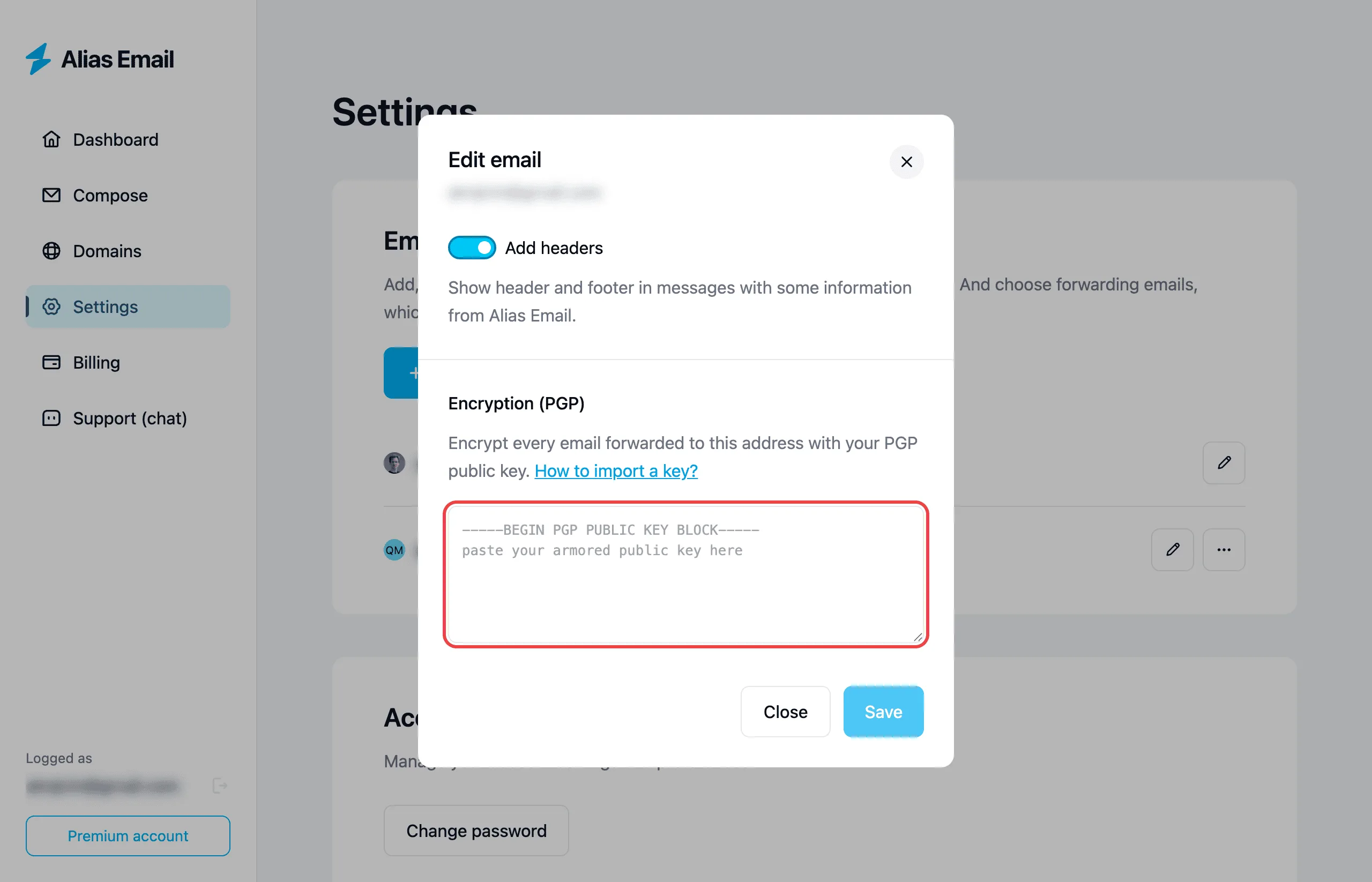
- Paste the public key. Copy the recipient’s ASCII-armored public key — the block that starts with
-----BEGIN PGP PUBLIC KEY BLOCK-----— into the field and save. If Alias Email rejects the key, our guide on how to import a PGP key covers the requirements and the most common fix — removing an expiration date.
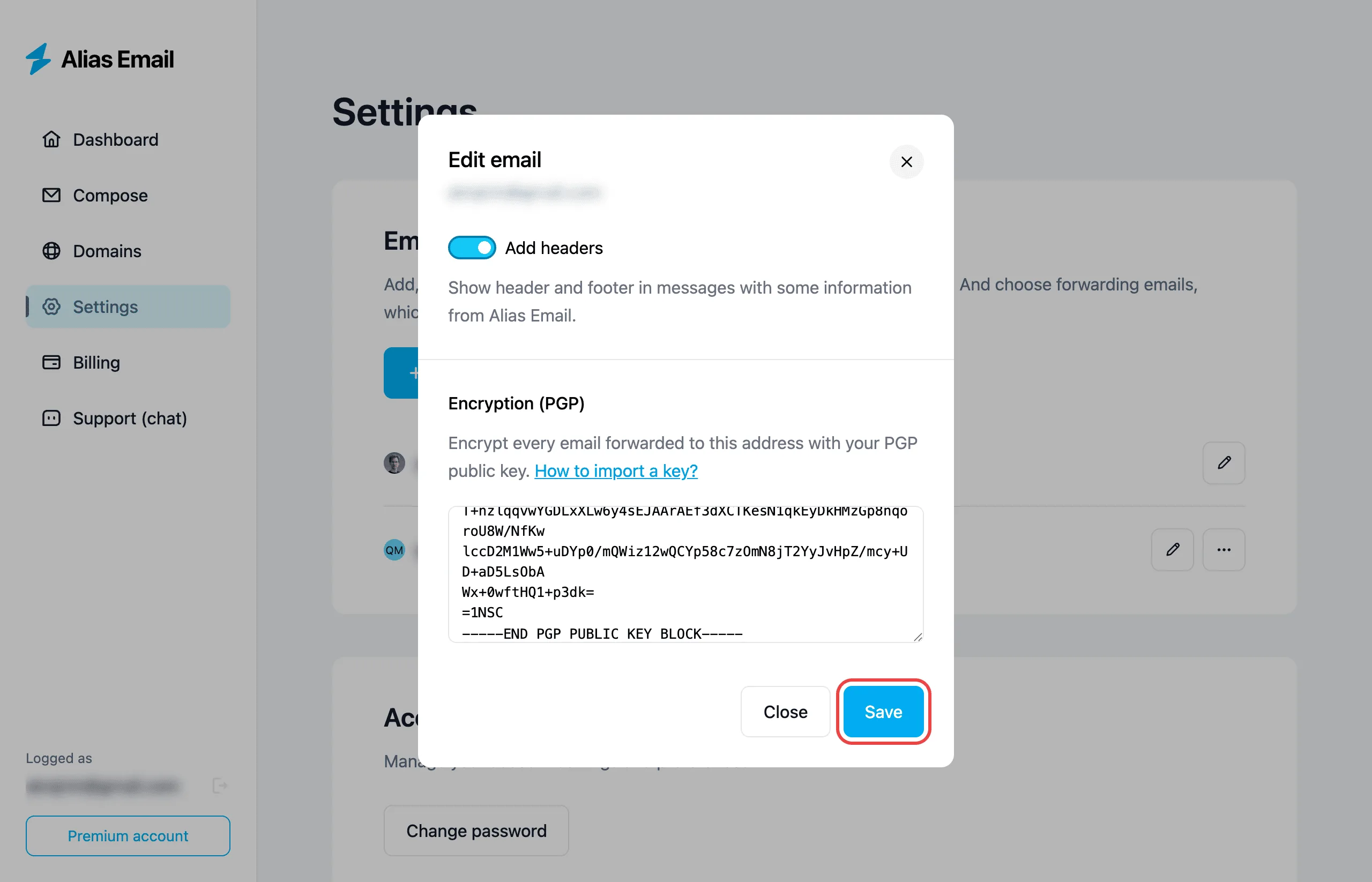
- You’re done. From that moment, every email forwarded to that address is encrypted with the key before it leaves our servers. To turn encryption off, simply remove the key.
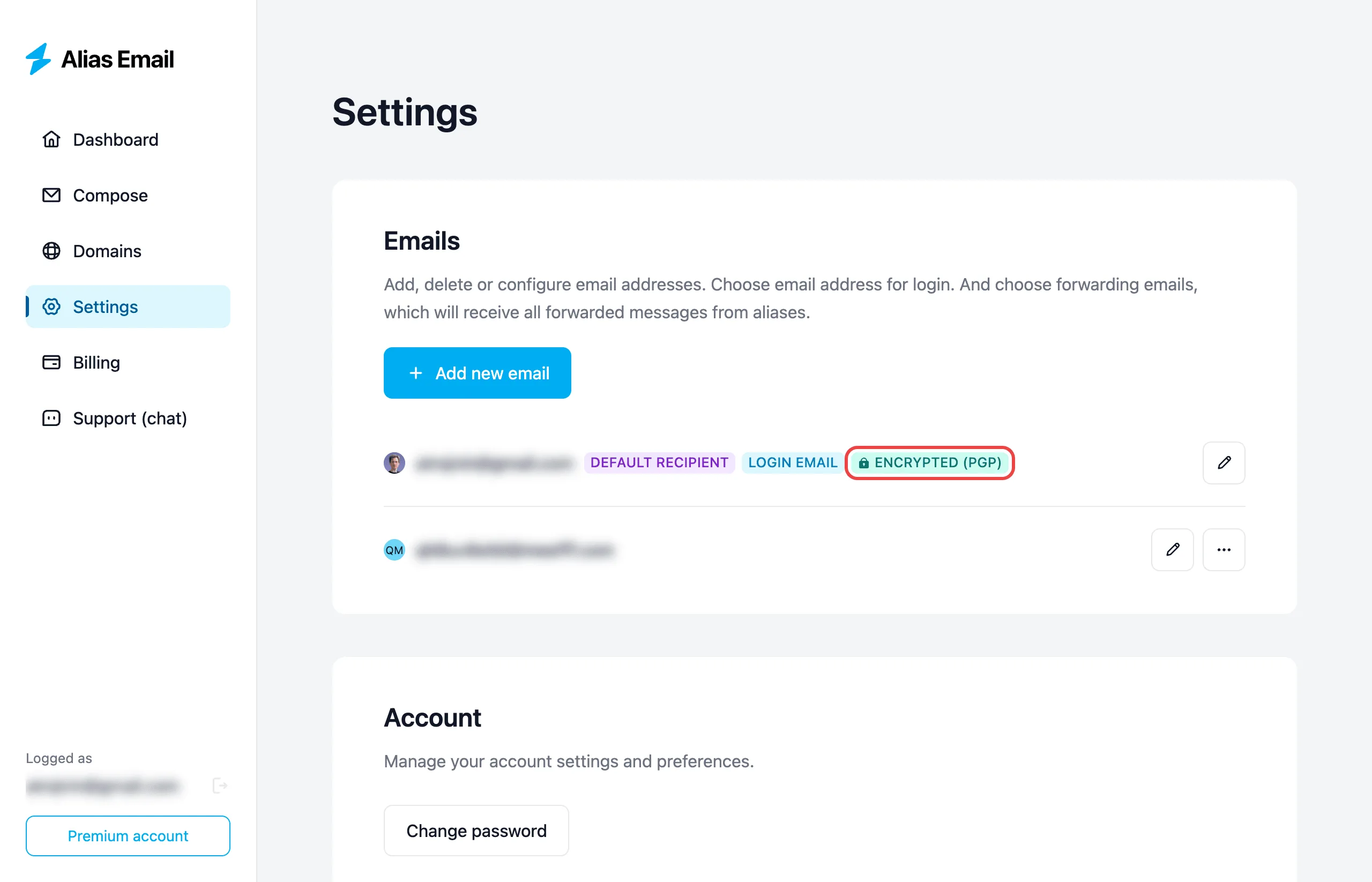
Because the setting lives on the recipient address, you stay in control: add a key to lock a destination down, update it when you rotate keys, or remove it to go back to standard forwarding. Your aliases keep working exactly as before — the only change is that the mail arriving at a keyed destination is now sealed.
How to Get a PGP Key Pair
If you don’t already have a PGP key, creating one is free and takes a few minutes. A few common routes:
- GnuPG (GPG) — the free, open-source reference implementation. Install GnuPG (or a friendly front-end like GPG Suite on macOS or Gpg4win on Windows) and generate a key pair with a single command or a guided dialog.
- Your email client. Thunderbird has built-in OpenPGP support; browser extensions like Mailvelope add PGP to webmail. Many privacy-first providers, such as Proton Mail, manage keys for you automatically.
Whichever tool you use, the rules are the same: export and share the public key (that’s what goes into Alias Email), and keep the private key private and backed up. The EFF’s Surveillance Self-Defense guides are an excellent, plain-language walkthrough if you want to go deeper. Once your public key is in hand, adding it to a forwarding address takes about thirty seconds.
Key Takeaways
- TLS is transit-only. Standard email is encrypted between servers but stored as plain text in your mailbox, where providers and breaches can read it.
- Aliases hide who you are; PGP hides what was said. Together they protect both your address and your message content.
- Forwarding adds a plaintext copy. PGP encryption seals the forwarded message so only your private key can open it — removing the need to trust the forwarder or your mailbox provider with the content.
- Know the limits. PGP protects the message body and attachments, not metadata or the subject line, and there’s no recovery if you lose your private key.
- Setup is quick. On Premium, paste a recipient’s public key onto a forwarding address and every message to it is encrypted automatically.
FAQs
Do I need to be technical to use PGP with Alias Email?
Not really. The one-time step is generating a key pair, which modern tools like GPG Suite, Gpg4win, or Thunderbird make point-and-click. After that, you just paste your public key into Alias Email once, and encryption happens automatically for every message forwarded to that address.
Does PGP encryption hide the subject line?
No. Standard PGP encrypts the message body and attachments, but the subject line and routing metadata (sender, recipient, timestamps) are not encrypted. Avoid putting sensitive information in subject lines, and treat them as if they were public.
Can Alias Email read my encrypted mail?
Once a public key is set on a recipient address, the forwarded message is encrypted with that key before it leaves our servers, so we cannot read the content — only the holder of the matching private key can. As a policy we don’t read your mail regardless, but PGP turns that promise into cryptographic fact.
What happens if I lose my private key?
Messages encrypted to that key become permanently unreadable — there is no backdoor or reset, which is exactly what makes PGP secure. Always back up your private key somewhere safe (an encrypted drive or password manager), and keep a revocation certificate so you can retire a compromised key.
Is PGP encryption available on the free plan?
Per-recipient PGP encryption is a Premium feature. The free plan still gives you aliases, forwarding, and tracking protection; adding a PGP public key to a forwarding address requires a Premium subscription. You can compare plans on our pricing page.
Does PGP replace using aliases?
No — they solve different problems and work best together. Aliases keep your real email address hidden from the services you sign up with, while PGP keeps the content of forwarded messages unreadable to anyone but you. One protects your identity; the other protects your words.
Email will always be a system built on plain text — but that doesn’t mean your mail has to stay readable to everyone who stores it. Aliases already keep your real address out of sight; PGP encryption takes the final step and seals the message itself, so a forwarded email is private from our servers all the way to rest in your inbox. If you’re ready to lock down both your address and your content, start with a free alias from Alias Email and add PGP encryption whenever you’re ready.